

The quote is ready on screen, but the version that goes to the customer is still being edited by hand in a word processor. On the delivery note a product name spills out of its row, the reader cannot scan the barcode on the label, and on the invoice copy a customer name has lost its Turkish letters. These are the most visible faults an application has, because they are the part customers actually hold. To generate PDF documents and labels from software means producing those outputs automatically from data and a template, in the same layout every time.
This guide covers the production approaches, the split between template and data, page-count math for long tables, Turkish character and format problems, label sizes, file size, generation time, the storing decision, security, testing and payback. All figures are representative examples, not measurements of any tool or industry averages. The topic is visual documents; official XML documents such as e-invoices are a separate matter.
What Is PDF Document Generation from Software?
It is the application turning records into quotes, order forms, delivery notes, labels or reports by merging the data with a template and rendering a PDF. The system picks the right template, fills in the fields and saves the file under a document number.
In hand-made documents every copy differs a little; in generated documents the only difference is the data. For the wider frame, see our what is custom software guide.
We recommend reading: Our custom software service
Which Generation Approach Should You Choose?
There are four common routes, and the choice depends on how often the document changes and who edits it.
| Approach | Pros | Cons | Suited to |
|---|---|---|---|
| Web page to PDF | Designed in a language the web team already knows; templates change quickly | Page breaks and printer sizes need separate tuning; needs a rendering environment | Quotes, order forms, reports |
| Direct PDF drawing | Millimetre-accurate placement; fast and light | Every change is a code change; long flowing text is tedious | Labels, fixed barcode layouts |
| Document template engine | Business users prepare the template; code stays unchanged | Limited template language; complex tables strain it | Contracts, letters, standard forms |
| Browser print | No infrastructure needed | Output varies by browser and printer; nothing is stored on the server | Instant output that needs no record |
A mixed setup works for most businesses: labels are drawn directly, long tabular documents come from a web template. Anything that goes to a customer is generated on the server; browser printing is only for temporary output.
How Do You Separate the Template from the Data?
The template is the shape of the document; the data is what belongs to this one document. If they mix, every small change turns into a software task.
- Variable: A single value such as customer name, document number or date.
- Repeating row: A list such as order lines; you define one row in the template and it repeats as many times as the data has items.
- Conditional block: With no discount the discount row does not appear; for cash on delivery a payment note does.
- Calculated field: Totals and tax are calculated when the record is saved and the document only displays them, so screen and printout come from the same source.
Documenting a template's fields fits the principle in our software documentation guide.
How Do You Calculate Page Breaks in a Multi-Page Table?
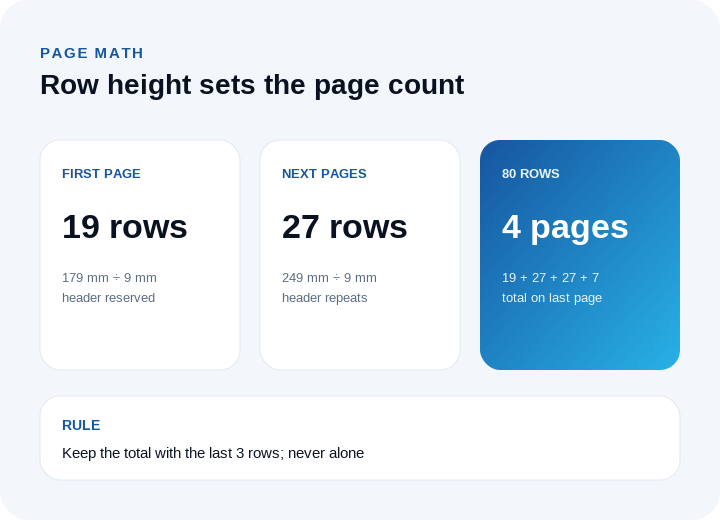
The page count is roughly row height times row count, divided by the usable page height. An A4 page is 297 mm; with 15 mm top and bottom margins and 10 mm for a footer, the body is 257 mm. If the first page carries a 70 mm document header and an 8 mm table header, 179 mm is left for rows; on later pages it is 257 − 8 = 249 mm. With 9 mm rows, the first page fits 19 rows and later pages fit 27.
Page count ≈ 1 + round up((row total + totals block − first-page space) ÷ later-page space). With a 40 mm totals block, an 80-row order gives (720 + 40 − 179) ÷ 249 = 2.33, so 1 + 3 = 4 pages. Rows cannot be split, so the formula gives a lower bound; the real layout is 19 + 27 + 27 + 7 rows, with 7 rows and the totals block on page four.
| Row count | Layout (rows per page) | Pages | Issue |
|---|---|---|---|
| 15 | 15 | 1 | Totals fit on page one (135 + 40 = 175 ≤ 179 mm) |
| 17 | 17 + 0 | 2 | The totals block lands alone on page two |
| 50 | 19 + 27 + 4 | 3 | Only 4 rows and the totals on the last page |
| 80 | 19 + 27 + 27 + 7 | 4 | Normal |
In the 17-row order the table fits but the totals do not, and a totals block stranded alone confuses the reader. The fix:
- Repeat the header row on every page.
- Put the totals only on the last page and keep at least the last 3 rows with them. With 17 rows, 14 go on page one and 3 plus the totals on page two (27 + 40 = 67 mm).
- Never split a row, and print "Page X of Y" so a missing page is easy to spot.
Why Do Turkish Characters, Fonts and Number Formats Cause Trouble?
If the font embedded in the PDF lacks the Turkish letters, they appear as empty boxes or in a fallback font. Six letters need separate checking: ı, İ, ş, Ş, ğ, Ğ. The ₺ symbol is also missing from some older fonts.
Upper-casing depends on locale too: in Turkish "istanbul" becomes "İSTANBUL" in capitals, while the default rule produces "ISTANBUL". The template must know the document language as its locale. Put a small test sentence (ıİşŞğĞüÜöÖçÇ ₺, 13 characters) on every new template.
| Item | Turkish | English | Note |
|---|---|---|---|
| Number | 1.234.567,89 | 1,234,567.89 | Thousands and decimal separators swap |
| Currency | ₺1.234,50 | ₺1,234.50 | Symbol and format follow the locale |
| Date | 21.11.2026 | 2026-11-21 or 11/21/2026 | 03.04 and 04/03 can be confused; spelling out the month is safe |
| Time | 14:30 | 2:30 PM | State the time zone on the document |
Choose the language by the recipient, not by the interface language of the user. Store date and time in one standard zone and show local time on the document.
How Do You Set Label Size and Barcode Readability?
A label printer works in dots, not millimetres, so convert sizes up front. A 100 × 150 mm shipping label is about 799 × 1,199 dots on a 203 dpi printer (mm ÷ 25.4 × 203). The same label is 1,181 × 1,772 dots at 300 dpi, 378 × 567 pixels on screen (96 px per inch) and 283.5 × 425.2 points in a PDF (72 points per inch). One dot at 203 dpi is 0.125 mm.
A barcode reads well when three things hold: module (thinnest bar) width, quiet zone around it, and print sharpness. A 95-module symbol printed at 3 dots per module is 285 dots, or 35.7 mm. With a 10-module quiet zone on each side (a common practice; the exact value depends on the symbology) the total is 115 modules = 345 dots = 43.2 mm, which fits the label easily.
- Make the module a whole number of dots: If the driver shrinks the page to 95%, 3 dots become 2.85 and the edges blur. Scale must be 100%.
- Draw the barcode instead of using a picture, and keep frames and text out of the quiet zone.
For barcode types see our barcode system guide; for the carrier side of the label see our shipping integration guide.
How Do You Manage File Size, Generation Time and Concurrency?
Embedded images and fonts, not text, usually decide file size. Suppose each document embeds a 1,200 KB high-resolution logo, the full fonts of four styles (4 × 380 = 1,520 KB) and 30 KB of text: that is 2,750 KB. Scale the logo to display size (40 KB) and subset the fonts to the characters used (4 × 45 = 180 KB) and the document drops to 250 KB, a 90.9% reduction. A nightly job of 5,000 documents then produces 1,250 MB instead of 13,750 MB.
For time, multiply per-document time by the count. At 400 ms per document, 5,000 documents in sequence take 2,000 s, or 33.3 min; with four parallel workers, 8.3 min. If the daytime peak is 300 documents per minute, that is 5 per second × 0.4 s = 2 workers permanently busy; with four workers utilization is 50%.
- Do not run long jobs inside the request: At 150 ms per page, a 300-page report takes 45 s and exceeds a 30 s request limit; queue it and notify the user when it is ready.
- Prioritize the queue: A document a customer is waiting for must not sit behind the nightly batch. At 150 MB per worker, four workers need 600 MB.
Measure behaviour under load with the method in our performance testing guide.
Should You Store Generated Documents or Regenerate Them?
Store what goes to a customer. If you regenerate every time, a template change alters past documents, and a customer opening an old quote sees different wording. Drafts and previews are not stored; they should always show current data. Delivery notes and labels are stored because they record a shipment. For invoice copies the official record rules apply; ask your financial advisor (certified accountant).
Each document record keeps the template version (for example v7), generation time and a file checksum. Storage is small: 200 documents a day × 250 KB = 50 MB, 18.25 GB a year, 91.25 GB over five years. Ask your legal counsel and financial advisor how long official documents must be kept. For the wider archive picture, see our document management system guide.
How Do You Handle Document Numbers, Security and Accessibility?
A document number is assigned when the document is finalized, not before, and is not reissued on retries. If every retry takes a new number, gaps appear: a 1% retry rate over 5,000 documents leaves 50 empty numbers. Give each generation request a unique key (document ID and version) and a repeated request returns the same document. If numbering is legally required, ask your financial advisor.
- Signed, expiring links: The document address carries the document ID, an expiry (for example 15 minutes) and a signature; an expired or altered link fails. Keep personal data out of the address, and ask your legal counsel about KVKK (Turkey's personal data protection law).
- Access checks: Knowing the link is not enough; the server also checks the user's right to the record.
- Accessibility: A tagged (structured) PDF tells screen readers about headings and tables; set the document language as well.
How Do You Test Document Output and Handle Failures?
Document testing is done by automated visual comparison, not by eye: an approved sample is compared pixel by pixel with the new output, and the test fails if the difference passes a threshold. For the general approach, see our software testing guide. Each template carries these scenarios:
- Zero and one row: The empty table should say "no items" and no blank page should appear.
- Page boundaries: Edge values such as 15, 17, 19 and 20 rows.
- Long names and addresses: In a 60 mm column, 9 pt text holds about 37 characters; a 64-character product name wraps to 2 lines and the row grows from 9 mm to 14 mm. Overflowing text must wrap, not be cut.
- Turkish letter sentence: All six letters and ₺ must print correctly.
- Printer run: Print the label on a real printer and scan it.
When generation fails, show the user a clear error code and a "document could not be prepared" message, and retry in the background after 1, 2 and 4 minutes. If 75 of 5,000 documents fail the first time, success is 98.5%; if retries save 70 of them it reaches 99.9% (4,995 documents). The remaining 5 go to a fallback template or a manual queue. Generation is also tracked as a step in the order lifecycle.
How Quickly Does Document Generation Pay Back?
Take a quote and order form flow of 50 documents a day, 22 working days a month, at ₺300 per hour (representative). Preparing by hand takes 6 minutes per document: 50 × 6 × 22 = 6,600 min = 110 h = ₺33,000. Hand preparation has a 4% error rate (44 documents) at 15 minutes each to fix: 11 h = ₺3,300. With automated generation, checking takes 1.2 min: 50 × 1.2 × 22 = 1,320 min = 22 h = ₺6,600; the error rate is 1% (11 documents): 2.75 h = ₺825.
Gross gain is 33,000 + 3,300 − 6,600 − 825 = ₺28,875. With ₺4,500 a month in running costs the net is ₺24,375. If template design and infrastructure cost ₺195,000, payback is 195,000 ÷ 24,375 = 8 months. If the gain halves (14,437.5 − 4,500 = ₺9,937.5), payback stretches to about 19.6 months.
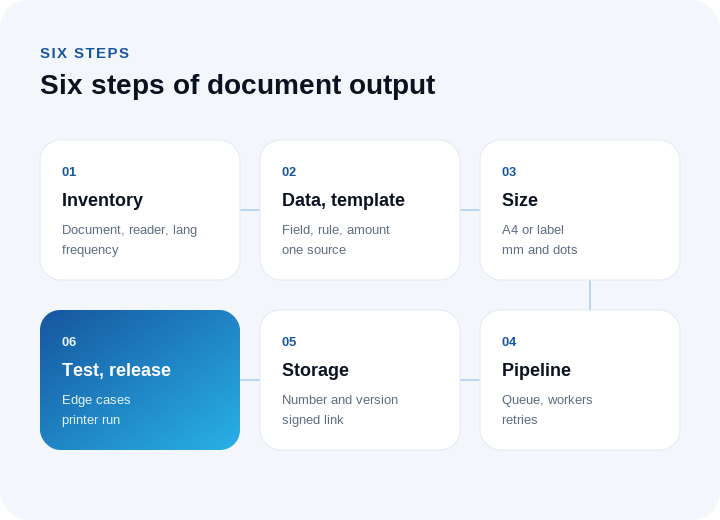
What Are the Six Steps to Roll Out Document Generation?
Treat output as its own requirement, not a detail added later.
- Document inventory: Which document, for whom, in which language, how often?
- Data and template: Fields, conditional blocks, calculated amounts.
- Size decision: Page, label and printer resolution.
- Generation pipeline: Queue, worker count, timeout, retries.
- Storage and numbering: What is stored, when the number is assigned, how versions are kept.
- Test and release: Release once edge cases and the printer run pass.
We recommend reading: What is e-invoice (e-Fatura) integration?
We recommend reading: How to Set Up Transactional Message Template Management: Email, SMS and Push Templates, Variable Contracts, Versions and Payback Guide
Custom Software That Produces Documents and Labels with İnovabil
At İnovabil our focus is building company-specific software from scratch, and document and label output is one of the requirements of that software. We suggest writing down the format, fields and storage expectations of your outputs during the requirements stage.
We built CRM, purchasing and mobile for Avcılar İnşaat; a purchasing system for İZBAN; logistics and shipment planning for Karyak; warehouse management and a complaint and support management system for Sleepy; shipment planning for Bofigo; and a prepaid cargo system for Kredili Kargo. Send us a short note on which documents you prepare by hand and we will build the inventory together.
We recommend reading: Our software development process: from analysis to release
Frequently Asked Questions
How do you generate PDF documents and labels from software?
By merging record data with a template and rendering a PDF. Template and data are kept apart, the document is saved under a number, and sizes are derived by calculation.
Should you choose web-page-to-PDF or direct PDF drawing?
Web templates suit long, tabular, frequently changing documents; direct drawing suits fixed labels. Most businesses use both.
Why do Turkish characters come out broken in a PDF?
If the embedded font lacks those letters or the ₺ symbol, boxes or a fallback font appear. Embedding the font and printing a test sentence prevents it.
Why does a barcode not scan on a label printer?
Usually the module width is not a whole number of dots, the driver shrank the page, or the quiet zone is too small. Keep scale at 100%, fit the module to whole dots and test with a real scanner.
Should generated documents be stored?
Documents sent to customers and those that serve as records should be stored, because regenerating after a template change rewrites history. Drafts need not be stored. Ask your financial advisor and legal counsel about official retention rules.