

A customer wants a 160 cm work desk with walnut veneer, a metal base, two drawers and electric height adjustment. The sales rep gathers the options in a spreadsheet, adds up the price by hand and sends the quote. When the order arrives, production calls back: "that base cannot take the electric lift anyway." A product configurator (CPQ, short for configure, price, quote) is the system that offers only buildable combinations for products with options and generates the price and the bill of materials from the same selection.
In this guide we cover what a configurator is, how it differs from quote management and product information management, the option and rule model, combination explosion, price and margin math, how a selection turns into a bill of materials and work order, the gain in order accuracy and speed, an illustrative payback period and a six-step setup. The products, prices and amounts in the example are all illustrative; they are not real prices or industry averages.
What Is a Product Configurator (CPQ)?
A product configurator is an application that lets a buyer or a sales rep build a product option by option, calculating compatibility, price and production data from rules at every step. The CPQ acronym combines three jobs: configuring, pricing and quoting.
It pays off for products with options or made to measure: furniture, machinery, electrical panels, doors and windows, bicycles, industrial equipment. If your product is a single item with no options, you do not need a configurator; if the item count is small and the price list is tidy, price list management may be enough.
We recommend reading: What is quote management software? Lifecycle, discount approval and payback
How Does a Configurator Differ From Quote Management and PIM?
The three are often confused, but each answers a different question: the configurator asks "which options can this product be built with and what does it cost?", quote management asks "who approved this quote, where is it and at what discount?", and product information management (PIM) asks "what are the product's name, attributes and images?"
| System | Core question | What it produces | Example output |
|---|---|---|---|
| Configurator (CPQ) | What is the valid combination and price? | Selection, price, bill of materials | "160 cm, walnut, U-shaped metal base" at ₺18,000 list |
| Quote management | How is the quote process going? | Approval, version, follow-up, order | T-2041 v2, manager approval |
| PIM | Where is product data and is it right? | Name, attributes, images, channel content | Product page copy, size table |
| ERP bill of materials | What does production need? | Material and operation list | A seven-line work order |
In practice the configurator works alongside quote management: the chosen configuration becomes a quote line. We also covered product data and channel content in our PIM guide; a configurator can use that data on the option screen but does not replace it.
How Do You Build the Option and Rule Model?
The model has two parts: option groups (size, finish, base and so on) and the rules between them. Keep the options simple first, then write rules only for combinations that truly cannot be built or that you do not want to sell.
| Rule type | What it does | Example |
|---|---|---|
| Required option | Makes a specific option mandatory under a condition | A cable channel is required at 180 cm |
| Incompatible option | Blocks two options from being chosen together | Electric lift cannot be chosen with a wooden base |
| Dependent option | Narrows a list after another choice | The second drawer is hidden at 120 cm |
| Default value | Fills in the standard option if none is picked | Standard white if no finish is chosen |
| Limit | Sets a number or size range | Custom width at most 200 cm |
Three rules are enough for the example desk: electric lift only with a metal base; a second drawer only at 140 cm and above; a cable channel required at 180 cm. If every rule can be written in one sentence, the model stays readable. Production and engineering, not just sales, should approve each rule, because a rule is what production has promised.
What Is Combination Explosion and What Do Rules Change?
Combination explosion is the rapid growth in product variants because option groups multiply. The example desk has six groups: size (4), finish (6), base (3), drawers (3), cable channel (2) and electric lift (2).
Without rules the product is 4 × 6 × 3 × 3 × 2 × 2 = 864 combinations. Listing each as a separately coded item is not realistic; add one more two-option group and the count rises to 1,728.
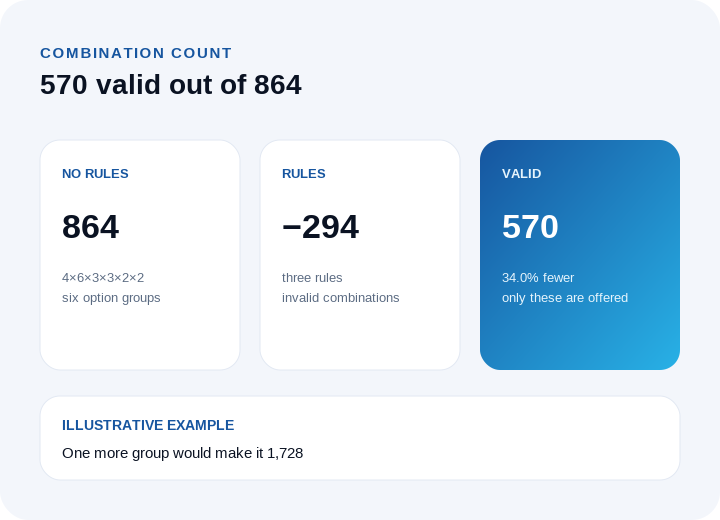
Counting with rules works like this. Base and electric lift together give 3 × 2 = 6 possibilities; wooden base with electric lift is invalid, so 5 valid pairs remain (wooden with no lift, plus two metal bases times two states). Size, drawers and cable channel are counted using the rules each size brings:
| Size | Drawer options | Cable channel | Valid triples |
|---|---|---|---|
| 120 cm | 2 (none, 1; the second is banned) | 2 | 2 × 2 = 4 |
| 140 cm | 3 | 2 | 3 × 2 = 6 |
| 160 cm | 3 | 2 | 3 × 2 = 6 |
| 180 cm | 3 | 1 (required) | 3 × 1 = 3 |
| Total | 19 (24 without rules) |
Valid count: 19 × 6 (finishes) × 5 (base and lift) = 570. Removed: 864 − 570 = 294, or 34.0%. The point is the logic, not the number: instead of a 570-row price list, 15 price rules are enough (calculated below), and an invalid combination never appears on screen.
How Is the Price of a Configured Product Calculated?
The price is a base price plus the option deltas; then a discount is applied and the margin floor is checked. Rather than writing a price for every combination, you store only the deltas: 1 base + (4−1) sizes + (6−1) finishes + (3−1) bases + (3−1) drawers + (2−1) channel + (2−1) lift = 1 + 3 + 5 + 2 + 2 + 1 + 1 = 15 price lines.
| Item | Selection | Delta / price |
|---|---|---|
| Base (120 cm, standard finish, wooden base, no drawers) | Starting point | ₺8,000 |
| Size | 160 cm | +₺1,200 |
| Finish | Walnut | +₺900 |
| Base | U-shaped metal | +₺1,500 |
| Drawers | Two drawers | +₺1,800 |
| Cable channel | Yes | +₺350 |
| Electric lift | Yes | +₺4,250 |
| List price | ₺18,000 |
The deltas sum to 1,200 + 900 + 1,500 + 1,800 + 350 + 4,250 = ₺10,000; 8,000 + 10,000 = ₺18,000. If the rep gives an 8% discount, the reduction is ₺1,440 and the price is ₺16,560. With a cost of ₺12,000 from the bill of materials (below), margin = (16,560 − 12,000) ÷ 16,560 = 4,560 ÷ 16,560 = 27.5%.
With a 25% margin floor, the lowest price is 12,000 ÷ (1 − 0.25) = ₺16,000, and the highest allowed discount is (18,000 − 16,000) ÷ 18,000 ≈ 11.1%. The system shows this limit on the line, and a deeper discount goes to approval. The discount approval matrix and margin protection are covered in our quote management article; for margin versus markup and how cost is derived, see our product cost guide.
How Does a Selection Become a Bill of Materials and Work Order?
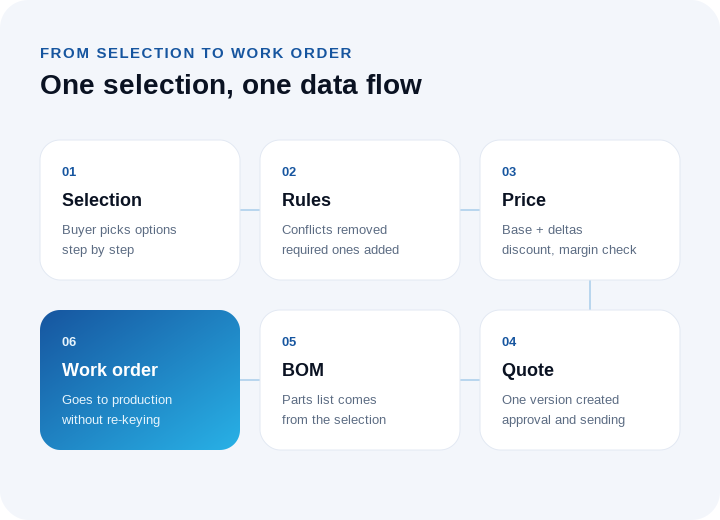
The configurator turns selections into material and labor lines, and that list goes to the ERP for production. Under each option sit the parts and quantities it uses; when the selection is complete, the lines are merged.
| Line | Which selection produces it? | Cost |
|---|---|---|
| Top 160 × 80, walnut veneer | Size + finish | ₺2,600 |
| U-shaped metal base set | Base | ₺2,400 |
| Electric motor and controller | Electric lift | ₺3,100 |
| Drawer unit (two drawers) | Drawers | ₺1,300 |
| Cable channel | Cable channel | ₺200 |
| Fasteners and packaging | Common to all | ₺400 |
| Assembly and inspection labor | Common | ₺2,000 |
| Total cost | ₺12,000 |
Total: 2,600 + 2,400 + 3,100 + 1,300 + 200 + 400 + 2,000 = ₺12,000. The quoted price and the production list therefore come from one selection, with no manual transfer between them. For the ERP side of recipes and net requirement calculations, see our production planning guide. We described what happens after a configuration is accepted in our order management system article.
Do You Need Visual or 3D Previews?
Not strictly, but they help sell. The simple version is a product image or layered picture that changes with the selection; a 3D preview needs design data and effort. Rules and pricing must work first; visuals are a second-stage improvement. A configurator that prices correctly with a plain picture is worth far more than a good-looking one that quotes wrong.
How Much Does It Reduce Order Errors and Quote Time?
Two gains are measured: the number of wrong orders and the time to prepare a quote. The table shows an illustrative business with 200 orders and 120 custom quotes a month.
| Measure | Before | After | Calculation |
|---|---|---|---|
| Wrong-order rate | 6% | 1% | 200 × 6% = 12; 200 × 1% = 2 |
| Cost per error | ₺4,500 | ₺4,500 | Rework, freight, returns (illustrative) |
| Monthly error cost | ₺54,000 | ₺9,000 | 12 × 4,500 and 2 × 4,500 |
| Quote preparation | 45 min | 10 min | −35 min (−77.8%) |
The monthly error saving is 54,000 − 9,000 = ₺45,000. The 35-minute difference across 120 quotes is 120 × 35 = 4,200 min = 70 hours; at ₺300 an hour, 70 × 300 = ₺21,000. Take the cost per error from your own records: use the last six months of returns, rework and freight invoices rather than a guess.
How Is the Payback Period Calculated?
Payback is how many months the monthly net benefit takes to recover the investment. The illustrative investment is 72 person-days × ₺9,000 = ₺648,000 (rule model, interface, pricing engine, ERP connection). Monthly maintenance and catalog updates are assumed at ₺12,000.
| Item | Calculation | Monthly |
|---|---|---|
| Fewer wrong orders | 12 − 2 = 10 errors × ₺4,500 | ₺45,000 |
| Quote time saved | 70 h × ₺300 | ₺21,000 |
| Gross benefit | ₺66,000 | |
| Rule and catalog upkeep | −₺12,000 | |
| Net benefit | ₺54,000 |
648,000 ÷ 54,000 = 12 months. If the error saving comes in at half, gross benefit is 22,500 + 21,000 = ₺43,500, net is ₺31,500 and payback stretches to 648,000 ÷ 31,500 ≈ 20.6 months. Low volume or a product with few options lengthens it, so recalculate with your own order counts before deciding.
How Do You Set Up a Configurator in Six Steps?
- Pick a product family: Start with the family that has the most options and the most errors, not the whole catalog at once.
- Extract the option groups: Sit down with sales, production and engineering and write out the groups and options; drop unnecessary options early.
- Write the rules: Write required, incompatible and dependent rules as one-sentence statements, each approved by someone in production.
- Connect price and cost: Enter the base and delta prices, the bill of materials lines for each option and the margin floor.
- Connect quote and ERP: Make the selection a quote line, and on acceptance make it flow to the ERP as a bill of materials and work order.
- Pilot and measure: In a four-to-six-week pilot, measure the wrong-order rate and quote time; fix the rules with real orders.
What Mistakes Do Configurator Projects Make?
- Trying to cover every option: Rare options inflate the rule count; cover the most commonly sold options first.
- Letting only sales write the rules: A rule production has not approved comes back when the order arrives.
- Leaving the bill of materials to the end: If the price is right but the list is wrong, the error has just moved to the factory.
- Not naming a catalog owner: If nobody updates prices and rules when they change, the configurator goes stale.
- Forgetting exceptions: The way to override a rule for a special request should be defined, with a reason and an approval.
We recommend reading: What is B2B e-commerce? Dealer portal, pricing and order guide
We recommend reading: What Is Price Optimization and Dynamic Pricing? Elasticity, Margin Floor, Rules and Testing Guide
We recommend reading: What Is a Business Rules Engine and Decision Table? Rule Management, Conflict Checks and Payback Guide
We recommend reading: Make to Order vs Make to Stock: How to Choose (Decoupling Point, Hybrid Strategy and Cost Guide)
We recommend reading: How to Estimate Costs for Custom Product Quotes: Estimating Methods, Risk Allowance and Quote Pricing Guide
We recommend reading: Bundle Inventory Management: How to Handle Kits, Virtual Bundles, Price Allocation and Partial Returns
Custom Software and CRM with İnovabil
At İnovabil our focus is building software from scratch, specific to your company: custom software, CRM, ERP, e-commerce, web, mobile and integration. We do not claim to have a ready-made product configurator; if you need to sell products with options, we recommend writing the rules, pricing logic and ERP connection down during requirements analysis and comparing an off-the-shelf tool against custom development by cost.
We built CRM, purchasing and mobile for Avcılar İnşaat; a purchasing system for İZBAN; logistics and shipment planning with wholesale order management for Karyak; and warehouse management plus a complaint and support management system for Sleepy. Tell us briefly about your product family and option structure, and we will assess fit together first.
We recommend reading: Our software development process: from analysis to release
Frequently Asked Questions
What is a product configurator (CPQ) and what is it for?
It is a system for products with options that offers only valid combinations and calculates price and bill of materials from the selection. It makes sure the product sold is the product built.
Is a configurator the same as quote management?
No. The configurator defines what the product is and what it costs; quote management runs that quote's approval, versioning, follow-up and order process. The two work together.
Does the system get complicated as rules multiply?
Yes. That is why each rule is a one-sentence statement approved by production, and rare options are left out at first. In the example, just three rules cut 864 combinations to 570.
Which businesses do not need a configurator?
Where products have no options or very few, a price list and quote template are often enough. A configurator makes sense where the option product has grown too large to manage in a list and wrong orders are expensive.
How long does payback take?
In the example, 12 months; if the error saving halves, about 20.6 months. The figures are illustrative; recalculate with your own order volume and cost per error.