

The only real inventory a consulting or software team holds is its people's time. If that time is not recorded accurately, which projects make money, whose capacity is full and how much to invoice a client all become guesswork. Time tracking and timesheet software records the hours people spend against a person, project, task and billable type, then routes them for approval and reporting. The hard part is not drawing a screen; it is getting entries that are complete and on time.
This guide covers the data model, entry habits, the two utilization rates, net capacity, the approval and locking flow, the rounding rule, budget-versus-actual tracking and the payback calculation. The examples use an imaginary ten-person services team, and all figures are illustrative.
What Is Time Tracking and Timesheet Software, and What Is It For?
Time tracking software captures what each person worked on and for how long, then makes that record usable for invoicing, capacity planning and project profitability. The entry screen looks simple; the value sits in the data model and the workflow behind it.
It does three jobs: it proves effort for invoicing, shows real capacity for planning, and gives past durations to size new quotes. A task tracking tool answers "what is the status of the work"; time tracking answers "what did the work cost".
We recommend reading: Our custom software service
How Do You Build the Data Model for Time Entries?
Each time entry starts with eight fields: who, which project, which task, which day, how many minutes, billable or not, a note and a status. Keeping the fields few makes entry both faster and more accurate.
| Field | Example value | Why it matters |
|---|---|---|
| Person | Employee ID | Capacity and utilization are calculated per person |
| Project and task | Portal / Design | Budget-versus-actual comparison and later estimates |
| Date and duration | 14 September, 90 min | Store minutes, not hours; apply rounding afterwards |
| Billable | Yes / No / Warranty | Utilization numerator and billable hours on the invoice |
| Note | Short description | Evidence in a client dispute or a review |
| Status | Draft, submitted, approved, locked | Stops an invoiced entry from changing |
Store the duration in raw minutes; rounding is only a rule applied at invoicing, so you can recalculate history when the rule changes. Do not squeeze billability into a yes/no field: a fix under warranty is not invoiced but is still real effort.
When Should Time Be Logged: End of Day, Timer or Weekly?
The later you log, the more hours you forget. Take an illustrative recall assumption for each habit: a live timer captures 98% of hours, end-of-day logging 92%, and a weekly batch fill-in 75%. These are assumptions chosen to show the arithmetic, not measurements.
The team works 10 × 40 = 400 hours a week, 72% of it (288 hours) is billable, and the hourly rate is ₺900. Unlogged hours are assumed to be billable at the same share.
| Habit | Hours logged | Missing hours / week | Unbillable value / week |
|---|---|---|---|
| Live timer (98%) | 392 hrs | 8 hrs | ₺5,184 |
| End of day (92%) | 368 hrs | 32 hrs | ₺20,736 |
| Weekly fill-in (75%) | 300 hrs | 100 hrs | ₺64,800 |
The end-of-day row: 400 × 0.92 = 368 hours logged, 32 missing; 32 × 0.72 × ₺900 = ₺20,736. The best results come from a mix: a timer for long tasks, end-of-day entry for short ones, and weekly fill-in only as a clean-up pass.
How Do You Calculate Entry Completeness and the Cost of Missing Hours?
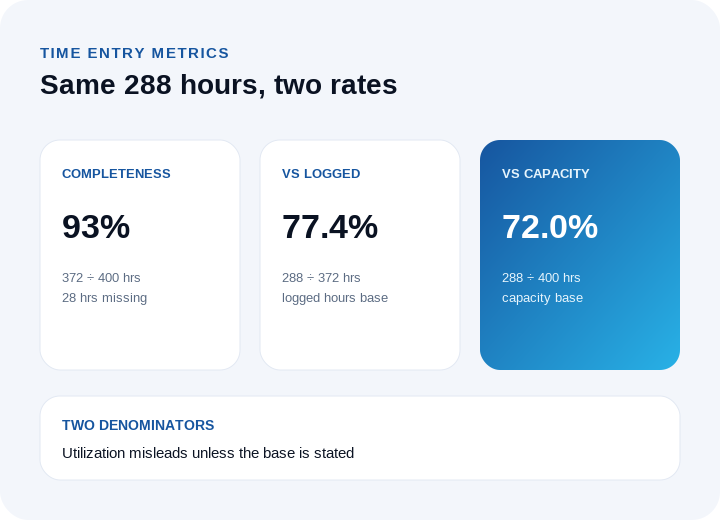
Entry completeness is logged hours divided by expected hours. In a week without leave, expected hours are 10 × 40 = 400 and logged hours are 372, so completeness is 372 ÷ 400 = 93%. The missing 28 hours were lost or booked wrongly.
To put a price on the gap, use the billable share of what was logged. Of the 372 logged hours, 288 are billable, a share of 288 ÷ 372 = 77.4%. If 28 × 0.774 ≈ 21.7 of the missing hours were billable, the loss is 21.7 × ₺900 ≈ ₺19,500 per week. That is an estimate, but it shows the order of magnitude.
How Do You Calculate Utilization with Two Different Denominators?
Utilization is billable hours divided by a denominator, and the denominator changes the answer; mix them up and the same team is reported as both "77%" and "72%".
| Rate | Formula | Example | What it shows |
|---|---|---|---|
| Utilization vs logged | Billable ÷ logged | 288 ÷ 372 = 77.4% | How much of the recorded effort earns revenue |
| Utilization vs capacity | Billable ÷ net capacity | 288 ÷ 400 = 72.0% | How much of the sellable time is actually sold |
The first inflates as missing entries grow, because fewer logged hours shrink the base. The second is independent of entry gaps and is the more honest management measure. Report both, with their denominators. Before setting targets, remember that a metric can break once it becomes a target; see our KPI guide for how indicators go wrong.
How Do You Find Net Capacity After Leave and Holidays?
Net capacity is gross hours minus time that cannot be sold, such as leave and public holidays, so a team on leave does not look "inefficient".
A four-week example: gross is 10 × 160 = 1,600 hours. During the month there are 7 person-days of leave (7 × 8 = 56 hours) and one public holiday for everyone (10 × 8 = 80 hours). Net capacity is 1,600 − 56 − 80 = 1,464 hours. With 1,152 billable hours, utilization against net capacity is 1,152 ÷ 1,464 = 78.7%; against gross it would be 1,152 ÷ 1,600 = 72.0%. Pull leave data from your leave and employee management system rather than typing it in; for shift-based teams, see shift scheduling for how capacity is placed.
How Should the Approval and Locking Flow Work?
An entry moves through four states: draft, submitted, approved and locked. Who may do what must be written down in advance, or hours that change after invoicing cause disputes.
| State | Who can change it? | Transition rule |
|---|---|---|
| Draft | The entry owner | The employee submits |
| Submitted | Only the approver can send it back | The project manager approves or rejects with a reason |
| Approved | A manager, with a reason | Locked when the billing period closes |
| Locked | Nobody directly | Only through a correction entry |
Keep the rhythm simple: submit by Friday 17:00, approve by Monday 12:00, lock on Tuesday. If approval drags, invoicing slips, so delegation and reminders are essential. For chain design, see our workflow and approval software guide.
How Do You Keep Retroactive Corrections and an Audit Trail?
A locked entry is never deleted or overwritten. A reversal entry closes the old one with negative duration and a new entry carries the correct value; both stay visible, so the correction and the original can be traced.
Each correction records who changed what, when and why. If the post-lock correction rate climbs, the problem is in how entries are prepared. For the design, see our audit log guide.
Why Does the Number of Task Codes Matter?
Too many task codes mean wrong codes: people who cannot find what they need pick the most familiar one. The rule: no one should see more than 15 codes on screen.
An illustrative measurement: out of 500 entries a month, with 8 active codes 15 entries land on the wrong code (3%), with 14 codes 30 (6%), with 32 codes 70 (14%). If each fix takes 5 minutes, the last case costs 70 × 5 = 350 minutes ≈ 5.8 hours. The remedy is to show each person only the codes of the projects they are assigned to: 6 projects with 5 tasks each make 30 codes, but a person on two projects sees 10.
- Two levels are enough: project and task; a shared task set (analysis, design, development, testing) allows comparison across projects.
- Keep internal codes separate: training, internal meetings and idle time never mix into client codes.
How Does the Rounding Rule Change the Annual Cost?
Rounding to 15-minute steps looks small but adds up over a year. If durations are spread evenly within a step, each rounding shifts the time by half a step on average, which is 7.5 minutes.
Say the team logs 40 billable entries a day, 220 working days a year, at ₺900 an hour. Rounding up shifts 40 × 7.5 min = 300 min = 5 hours a day; over a year that is 5 × 220 = 1,100 hours, or 1,100 × ₺900 = ₺990,000. Rounding down loses the same amount; rounding to the nearest step has an expected difference of about zero. With a 5-minute step the gap falls to 40 × 2.5 ÷ 60 × 220 ≈ 367 hours = ₺330,000.
The rule must be written into the client contract; rounding up can work against the client, so consult your legal advisor for details. Our advice: keep the raw minutes and round to the nearest step.
How Do You Compare the Project Budget with Actual Hours?
Budget-versus-actual tracking reads hours spent together with the work completed; spend alone misleads.
Example project: budget 400 hours, 300 spent (75%), work 50% complete. Earned hours = 0.5 × 400 = 200; efficiency = 200 ÷ 300 = 0.67. At that pace the projected total is 400 ÷ 0.67 = 600 hours, a 200-hour overrun. If the remaining work goes to plan, the estimate is 300 + (400 − 200) = 500 hours, a 100-hour overrun; the gap depends on whether the early inefficiency will repeat. For milestones see our project plan guide, and for the monetary side see project cost and profitability tracking.
How Should Overtime and Employee Monitoring Be Handled?
Overtime should be a separate field, but its limits and pay are a matter of employment law; get a written decision from your legal advisor and HR specialist before building rules into the software.
Time tracking is a recording tool, not a surveillance tool. We do not recommend screenshots, keystroke capture or location tracking; they erode trust and carry risk under personal data and labor law. The transparency principle: employees are told in writing, in advance, what is recorded, who sees it and what it is used for. For KVKK (Turkey's personal data protection law) details, consult your legal advisor.
Which Metrics Keep Time Tracking Healthy?
Four metrics are enough; nobody watches more.
| Metric | Calculation | Example | Sample target |
|---|---|---|---|
| Entry completeness | Logged ÷ expected | 372 ÷ 400 = 93% | ≥ 97% |
| On-time submission | People submitting on time ÷ people | 8 ÷ 10 = 80% | ≥ 95% |
| Post-lock corrections | Corrected entries ÷ locked entries | 6 ÷ 372 = 1.6% | ≤ 1% |
| Utilization rates | Billable ÷ logged, ÷ net capacity | 77.4% and 72.0% | Depends on the service model |
Targets are illustrative; set them for your own service model. Keep reminders few: one on Friday afternoon, one on Monday morning.
How Do You Calculate the Payback of Time Tracking Software?
Payback is the value of the billable hours recovered divided by the investment. In the example, completeness rises from 93% to 98%, a gain of 5 points.
Hours recovered per week are 400 × 5% = 20; at a 77.4% billable share that is 20 × 0.774 ≈ 15.5 hours, worth about ₺13,935 a week, or roughly ₺55,740 over a four-week month. With ₺6,000 a month in running costs, the net gain is about ₺49,740. For an investment of 24 person-days × ₺9,000 = ₺216,000, payback is 216,000 ÷ 49,740 ≈ 4.3 months. If the gain halves (₺27,870 − ₺6,000 = ₺21,870), payback stretches to about 9.9 months. Whether the recovered hours actually turn into invoices and collections must be verified separately.
How Do You Set Up Time Tracking Software Step by Step?
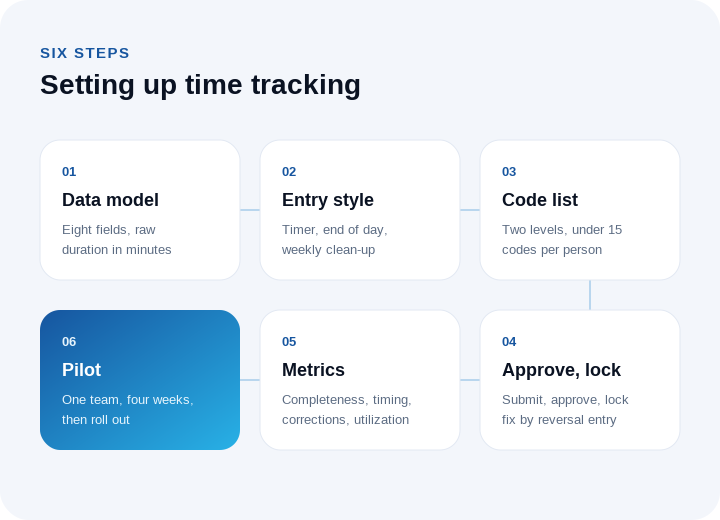
- Data model: Set the purpose of the entries (invoicing, capacity, cost) and the fields.
- Entry style: Match timer, end-of-day and weekly clean-up to the type of work.
- Code list: Design two levels, under 15 codes per person.
- Approve and lock: Write down the states, rhythm, delegation and the correction entry.
- Metrics panel: Put the four metrics on a dashboard with their denominators.
- Pilot: Run one team for four weeks, then roll out.
To put the requirements in writing, see our requirements analysis guide, and for the wider frame, what is custom software.
We recommend reading: How to Do Resource and Capacity Planning for Project Teams: Net Capacity, Heat Map and Overload Guide
Time Tracking and Project Software Built Around Your Processes with İnovabil
At İnovabil our focus is building software from scratch, specific to your company: custom software, ERP, CRM, e-commerce, web, mobile and integration. Because time entry and approval flows differ from team to team, we suggest handling them in requirements analysis, compared with existing tools.
We built CRM, purchasing and mobile for Avcılar İnşaat; a purchasing system for İZBAN; logistics and shipment planning with wholesale order management for Karyak; and warehouse management plus a complaint and support management system for Sleepy. Our process steps are analysis, design, development, testing, release, and maintenance and support. Send us a short summary of how your team works and we will draft a written scope together.
We recommend reading: Our software development process: from analysis to release
We recommend reading: Our work and project management software service
Frequently Asked Questions
What is time tracking (timesheet) software?
Software that records the time people spend by person, project, task and billable type, routes it for approval and reports on it. It supplies the base data for invoicing, capacity planning and project cost.
How is utilization calculated?
There are two common ways: billable hours ÷ logged hours and billable hours ÷ net capacity. For 288 billable hours in the example, the first gives 288 ÷ 372 = 77.4% and the second 288 ÷ 400 = 72.0%. Always state the denominator in the report.
Should time be logged at end of day or in real time?
The later you log, the more hours are forgotten. Under the illustrative assumption, a timer captures 98%, end of day 92% and weekly fill-in 75%. Timers for long tasks, end-of-day entry for short ones and a weekly clean-up pass together work best.
How is a locked time entry corrected?
It is neither deleted nor overwritten; a reversal entry closes the old one and a new entry carries the correct value. Who did it, when and why stays in the audit trail.
Does time tracking mean monitoring employees?
No. It records the time an employee reports; it does not watch screens or locations. Employees should be told the scope in advance, and KVKK details should go to your legal advisor.