

How many times a day does someone in your company ask, "What happened to that job?" Tasks are handed out in chat groups, tracking lives in an Excel file, approvals get lost in email, and only the person doing the work knows its real status. As the team grows, this arrangement falls apart. Task tracking software is the application that shows, in one place, who every job in the company is assigned to, what state it is in, when it will be finished and how much effort has gone into it.
In this guide we explain what task tracking software is and what it is for, its core features, how it differs from tracking through Excel and chat groups, how it is used in different industries, what to look for when choosing one, the difference between an off-the-shelf program and a custom task tracking system, and how to make the switch step by step.
What Is Task Tracking Software?
Task tracking software is an application in which a business's tasks are created, assigned to owners, updated, approved and reported on. It is also called task management software or a task tracking system.
What separates it from a simple to-do list is that it covers the whole life cycle of a job. A job is born as a request, is assigned to an owner, gets a start and due date, is enriched with comments, files and photos while it is being done, goes to approval when it is finished and closes once it is approved. Every step in that chain is recorded: who changed what, and when?
Task tracking software is not only for project teams. A technical service team's fault records, a purchasing department's requests, accounting's month-end closing checklist, HR's hiring steps and the daily jobs of field crews can all be managed in the same tool.
We recommend reading: Our work and project management software service
What Is Task Tracking Software For?
Task tracking software stops jobs from being forgotten, delayed or left without an owner, and lets managers see the status of everything without having to ask. In a business, this shows up in a few ways:
- No job gets lost: Nothing stays buried under a message, slips past in email or is promised verbally and forgotten; every job is a record.
- Responsibility becomes clear: Every job has a single owner and a due date, so "I thought you had it" disappears.
- Delays are seen early: Reminders and alerts fire for jobs that are approaching or past their due date, so problems are not discovered on delivery day.
- Meetings get shorter: Because status is already in the tool, meetings are spent on decisions instead of "where are we?"
- Knowledge stays in the company: Correspondence, files and decisions live inside the job, so work is not left half done when someone leaves or goes on leave.
- Effort and cost become visible: You can measure how much time went into which job, project or customer, so pricing and capacity plans rest on numbers.
What Features Should Task Tracking Software Have?
A good task tracking tool has task management, a status flow, notifications and reports at its core; depending on your needs, you add time tracking, approval flows, a customer portal and a mobile field app. The table below splits the features into basic and advanced.
| Feature | What it provides | Level |
|---|---|---|
| Task creation and assignment | Every job gets an owner, a priority and a due date | Basic |
| Kanban and list views | See at a glance which stage each job is in | Basic |
| Comments, files and photos | All communication about a job stays inside the job | Basic |
| Notifications and reminders | Alerts for new assignments and for approaching or overdue jobs | Basic |
| Subtasks and checklists | Large jobs are split into steps so nothing is missed | Basic |
| Reports and dashboards | Workload and delays by person, team and project | Basic |
| Approval flow | Finished work goes to a manager or the customer for approval | Advanced |
| Time and effort tracking | Time spent on a job is logged and billable hours are separated | Advanced |
| Project plan and Gantt | Phases, dependencies and a timeline | Advanced |
| Resource and capacity planning | See who is how loaded and spread work evenly | Advanced |
| Customer portal | Customers follow the status of their own job, open requests and approve | Advanced |
| Mobile field app | Field crews see their job list and send forms, photos and location | Advanced |
| Integrations | Data exchange with CRM, ERP, accounting and email | Advanced |
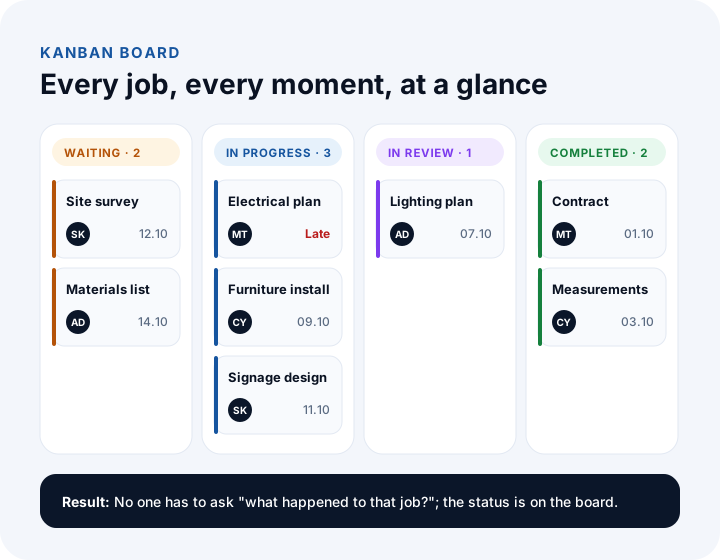
Why Aren't Excel and Chat Groups Enough for Task Tracking?
Excel and chat groups are fine for a small team with few jobs, but as the number of jobs and people grows, outdated files, lost messages and ownerless jobs become inevitable. The problem is not the tools themselves; they simply were not designed for task tracking.
An Excel file is only correct for as long as someone keeps updating it. Different versions of the same file circulate by email, there is no way to see who changed what and when, and nobody is warned about an approaching date. Chat groups are fast but they scroll away: a task assigned yesterday is buried under hundreds of messages today, it is unclear which job a photo belongs to, and when someone leaves the group the knowledge leaves with them.
| Topic | Excel and chat groups | Task tracking software |
|---|---|---|
| Task owner | Mentioned in a message, then becomes vague | A single, visible owner on every job |
| Current status | Whatever the last person to edit the file left | The person doing the work updates it and everyone sees it instantly |
| Reminders | None; follow-up depends on someone's memory | Automatic alerts for approaching and overdue jobs |
| History | Lost among messages | Who changed what, and when, is recorded |
| Files and photos | Scattered through the chat stream | Inside the relevant job |
| Permissions | Anyone who sees the file or group sees everything | Everyone sees only the jobs that concern them |
| Reports | Prepared by hand | Automatic by person, team and project |
Which Industries Use Task Tracking Software?
Task tracking software is used in every industry where several people run several jobs at the same time. What changes is the type of job being tracked and the extra features that are needed.
Agencies, consultancies and service businesses
Client work, revisions and delivery dates all run side by side. Time tracking and a customer portal stand out here: logged hours turn into invoices, and customers see the status of the work without asking and give their approval from the tool.
Construction, renovation and installation work
Jobs are split into phases, the phases depend on each other, and the work happens on site. A project plan, budget versus actuals, photos and forms from field crews, and phase approvals become critical.
Technical service and field teams
Fault, maintenance and installation records are handed to crews as a daily job list. From the mobile app you capture the start and end of a job, the materials used, photos and the customer's signature; where there is no connection, offline work is required.
Internal departments
Purchase requests, IT support tickets, HR processes and accounting closing checklists are workflows too. In these departments, request forms, approval flows and recurring tasks are the most used features.
We recommend reading: Industry software: solutions we build for your sector
What Should You Look for When Choosing Task Tracking Software?
The right program is not the one with the most features but the one your team will actually use every day. Evaluate the criteria below together when you choose:
- Ease of use: An interface that everyone, from field staff to managers, can learn in a few minutes. A complicated program does not get opened, and tracking drifts back to chat messages.
- Fit with your workflow: Can you define your own status steps (for example request, survey, quote, execution, inspection, delivery), or do you have to adapt to the program's fixed flow?
- Mobile use: If you have teams that work in the field or away from a desk, a mobile app and offline work are essential.
- Permission structure: You should be able to set who sees what by team, department, project and customer.
- Reports: Do reports already answer the questions you want to see as a manager: who is how loaded, which jobs are late, which project is profitable?
- Integration: Can it connect with customers in the CRM, orders in the ERP or invoices in accounting? Writing the same information in two places weakens tracking.
- Data and security: You should know up front where the data is kept, how it is backed up and how you can take it out if you ever want to leave.
- Total cost: Work out how the cost changes under per-user monthly fees as the team grows and as customers are added to the portal.
Off-the-Shelf Task Tracking Software or a Custom Task Tracking System?
An off-the-shelf program is enough if your workflow is standard, your team works at a desk and your needs stop at a task list; a custom system is more efficient if your workflow is unique to your company, field work, a customer portal and accounting meet in one process, or your user count is large.
Off-the-shelf task tracking programs start quickly and meet general needs well. But they are designed for the "average team": status steps, form fields and reports can only be changed to a limited extent, and needs such as field forms, progress payments or your own customer portal are usually solved with extra tools, so the data scatters again. In a custom system, the workflow, forms, approvals, reports and integrations are built around the way you work.
| Topic | Off-the-shelf task tracking software | Custom task tracking system |
|---|---|---|
| Getting started | Immediately; open an account and invite the team | Requires analysis and development time |
| Workflow | Within the templates the program offers | Built around your steps and rules |
| Forms and fields | Limited customization | Forms and checklists specific to your work |
| Field app and customer portal | Often an extra tool or extra fee | Part of the same system |
| Integration | Only as many connections as the program offers | With CRM, ERP and accounting as needed |
| Cost model | Per-user subscription that rises as the team grows | Development and maintenance; no per-user license |
| Best suited to | Small, desk-based teams with standard flows | Unique flows, field teams, many users, customer portals |
We recommend reading: Off-the-shelf or custom software? A decision guide
How Do You Switch to Task Tracking Software?
The switch begins not by installing the program but by writing down how work actually flows. Starting with one team and expanding, rather than moving the whole company on the same day, makes adoption easier. A healthy switch moves through six steps.
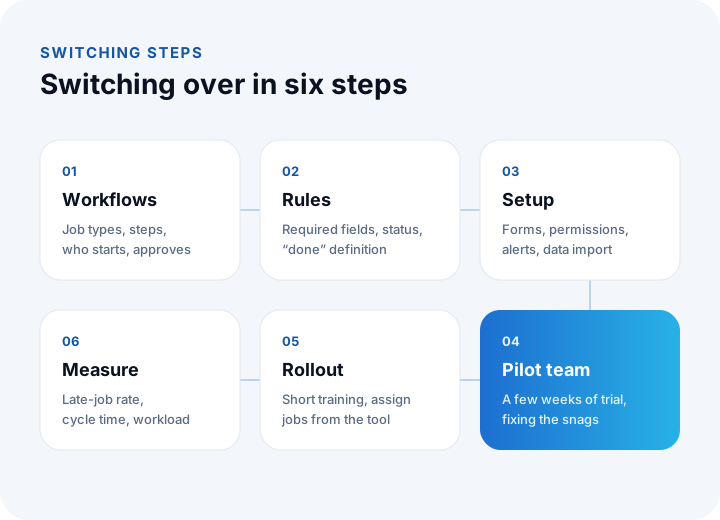
- Map your workflows: Which job types exist, what steps does each go through, who starts it and who approves it? Drawing it on paper or a whiteboard is enough.
- Set common rules: What information is needed to open a job, when is status updated, what does "completed" mean and how is an urgent job flagged? These rules must be the same for everyone.
- Set up and tailor the program: Status steps, forms, permissions, notifications and reports are configured to your workflows, and existing open jobs are imported.
- Start with a pilot team: The team whose work is most scattered, or the most willing one, uses the program for a few weeks and the rough spots are fixed.
- Roll it out: Other teams are added with short training sessions. Managers asking for work from the tool and assigning work through the tool is the most effective step in making it a habit.
- Measure and improve: Late-job rate, average completion time and workload distribution are monitored regularly; workflows and forms are updated as needed.
We recommend reading: Our software development process: step by step from analysis to launch
What Are the Most Common Mistakes in Using Task Tracking Software?
Task tracking programs mostly fail not because of a technical problem but because the habit of using them never sets in. The most common mistakes are these:
- Making the program only a manager's tool: If it is used only to supervise employees, the team avoids entering data. It must also be useful to the employee: seeing their own list, getting reminders, finding a file.
- Making everything a required field: If ten fields must be filled in to open a job, work goes back to being handed out by message. Keep required fields to a minimum.
- Keeping two systems alive: If the Excel list keeps being updated after the program is installed, both stay incomplete. After the switch date, the program must be the single source.
- Not updating statuses: Jobs that are finished but not closed make reports meaningless. Updating the status should be seen as part of the work.
- Expecting a perfect setup in one go: Workflows become clear with use. Keeping the first version simple and improving it with user feedback gets results faster.
What Is the Difference Between Task Tracking Software and Project Management Software?
Task tracking software focuses on carrying out individual jobs; project management software manages those jobs as a whole within phases, a calendar, a budget and a resource plan. In practice the two overlap, and as needs grow, task tracking expands toward project management.
For a technical service team, for example, tracking individual fault records is enough. But for a job such as a showroom installation, with phases, a budget, subcontractors and customer approvals, you also need a project plan, budget versus actuals and phase approvals alongside the tasks. In custom-built systems these two structures sit under the same roof, built only as far as the business needs.
We recommend reading: What Is CRM and What Is It Used For? A Complete Guide to Sales and Customer Management
We recommend reading: How to Choose Pre-Accounting Software: A Guide to Comparison, Scoring and Cost
We recommend reading: What Is Business Process Automation? Which Process to Automate First and How to Calculate Savings
We recommend reading: What Is Digital Transformation? A Maturity, Roadmap and Payback Guide for Small and Mid-Sized Businesses
We recommend reading: How to choose a CRM: criteria, scoring, cost and demo guide
We recommend reading: What is help desk software? Ticket life cycle, priority matrix, SLA compliance and team sizing guide
We recommend reading: How to move from Excel to software: signs, cost and data migration
We recommend reading: What is low-code? Limits, risks and cost of low-code development
Task and Project Tracking with İnovabil
At İnovabil we build task tracking systems starting from your workflow. First we work out together which job types go through which steps, who starts them and who approves them, and which questions the manager wants answered. Then we set up as much as you need of task and kanban management, approval flows, time and effort tracking, project plans, budgets, a customer portal and a mobile app for field teams.
We integrate the system with your CRM, ERP and accounting software so the same information is never written twice, and after launch we stay at your team's side until the habit takes hold.
Tell us in a few sentences how you track work today and where it breaks down most, and we will prepare a roadmap for a task tracking system built for you.
Frequently Asked Questions
What is task tracking software, in short?
Task tracking software is an application in which a business's tasks are created, assigned to owners, updated, approved and reported on. It shows in one place who each job sits with, what state it is in and when it will be finished.
Does a small team need task tracking software?
For a team of a few people with few jobs, a simple list may be enough. But if jobs have started to slip, get forgotten, or "who has this?" is asked often, task tracking software is worthwhile even for a small team.
Can task tracking software be used on mobile?
Yes. Mobile use is essential, especially for field, service and installation crews. From the mobile app you can see the daily job list, start and finish jobs, and send forms, photos and location; where there is no connection you can work offline and the data syncs later.
What is the difference between task tracking software and a CRM?
A CRM manages customer relationships and the sales process: customer records, opportunities, quotes and the sales funnel. Task tracking software manages the carrying out of work. When the two are integrated, an opportunity won in sales can automatically become a project or job record in the task tracking tool.
How long does a custom task tracking system take to build?
It depends on the number of workflows, on extra modules such as a mobile app and a customer portal, and on the systems to be integrated. At the end of the analysis we produce a timeline broken into work items; usually we start with the core task and approval flow and add the other modules in later releases.