

An invoice is "due in 30 days", a support ticket must be "answered within 4 working hours", an order ships "within 3 business days" and an approval is "decided within 2 business days". All four sentences rest on the same question: which days and hours count? In many systems the answer is a small date routine written separately on each screen, so one skips the weekend while another forgets the holiday. Business day calendar and SLA time calculation in software means collecting these rules in one calendar model so that every module gets its result from the same engine.
This guide covers calendar types, the calendar data model, holiday data management, the business-day algorithm, working-hour and SLA time calculation, pausing, time zones, due-date rules, performance, test scenarios and payback. All dates and figures are representative; the example holiday is a fictional company holiday. Legal time-limit rules belong with your legal counsel.
Which Calculation Uses Which Calendar?
There are four calendar types and each calculation picks one; a correct algorithm on the wrong calendar still returns the wrong date.
| Calendar type | Contents | Calculations that use it |
|---|---|---|
| Official business calendar | Weekends and official holidays | Due dates, bank transactions, official notice periods |
| Company calendar | Official calendar, company holidays, administrative leave days | Delivery promises, approval deadlines, internal task dates |
| Team calendar | Shift pattern, working hours, on-call | Support SLA, field service, warehouse dispatch time |
| Counterparty calendar | Working days of the customer or supplier | Supplier delivery, customer approval time |
Leave calculation is a special case: whether weekends and holidays count toward leave depends on company policy and legislation, so it is stored as a setting, not hard-coded. For balances, see leave and employee management software.
How this differs from neighbouring topics: appointment software covers the slot model, the delivery-promise guide covers promises tied to stock, and the maintenance agreement article covers SLA clauses. Here we cover the time calculation underneath all of them.
How Is the Calendar Data Model Built?
A calendar is four small tables: definition, weekly pattern, exception and a derived index. Rules live in data, not code, so adding a new team or country needs no code change.
| Table | Main fields | Note |
|---|---|---|
| Calendar definition | Name, time zone, validity start and end | A change opens a new version |
| Weekly pattern | Day, start, end, break | Example: 08:30–17:30, lunch 12:30–13:30, 40 hours a week |
| Exception day | Date, type, description, status, approver | Types: official holiday, company holiday, administrative leave, half day, extra working day |
| Business-day index | Date, is business day, sequence number, open minutes | Precomputed, rebuilt when an exception changes |
Do not forget the "extra working day": a weekend day worked by decision, if not counted, makes the delivery date wrong. The time zone is a property of the calendar, not of the user.
How Is Public Holiday Data Managed?
Hard-coding holidays or generating them with a formula is risky: some holidays fall on a different day each year, and bridge and administrative leave days are announced during the year. Dates are taken from official announcements and entered into a table; this article gives no dates.
- Who enters: HR or an operations owner; the record starts as a "draft".
- Who approves: A second person; an unapproved day is flagged "tentative" in calculations.
- Year-end check: Next year's table must be complete 30 days before the year ends; if it is missing, the system does not calculate silently but warns or rejects.
- Audit trail: Who changed what, when, and on which announcement is recorded.
How Are Business Days Added, Subtracted and Counted?
To add N business days, step forward day by day and decrement the counter only on business days. In the examples the fictional company holiday is Friday 20 November 2026 and the calendar runs Monday to Friday.
| Operation | Calculation | Result |
|---|---|---|
| Thursday 19 November + 3 business days, no holiday | Friday 1, Monday 2, Tuesday 3 | Tuesday 24 November |
| Same operation, Friday is a holiday | Monday 1, Tuesday 2, Wednesday 3 | Wednesday 25 November |
| Saturday 21 November + 0 business days | Not a business day, roll forward | Monday 23 November |
| Monday 23 November − 3 business days | Thursday 1, Wednesday 2, Tuesday 3 (Friday is a holiday) | Tuesday 17 November |
| Business days between 2 and 30 November | 21 weekdays − 1 holiday, both ends included | 20 business days |
Three rules must be written down: when adding zero business days, a non-business start rolls forward to the next business day; backward calculation is the same algorithm in reverse and forward-backward consistency is tested; and whether the endpoints are included when counting between two dates is documented.
How Are Working Hours and SLA Time Calculated?
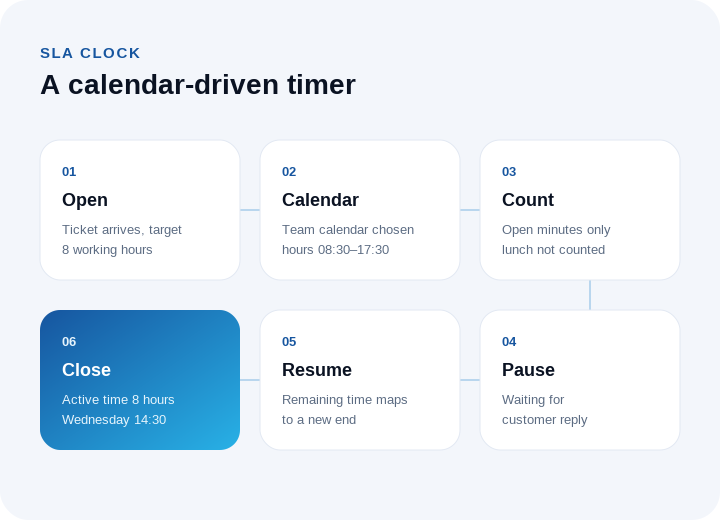
SLA time does not run on wall-clock time; it advances only in minutes when the calendar is open. A ticket that arrives outside working hours starts at the next opening. The example calendar is 08:30–17:30 with a 12:30–13:30 break, so a day has 8 working hours.
| Scenario | Calculation | Response time ends |
|---|---|---|
| Opened Friday 16:30, 4 working hours | 1 hour Friday, 3 hours Monday | Monday 11:30 |
| Opened Saturday 10:00, 4 working hours | Clock starts Monday 08:30 | Monday 12:30 |
| Opened Monday 12:00, 1 working hour | 12:00–12:30 half an hour, break, 13:30–14:00 | Monday 14:00 |
A period that ends right at the start of the break ends exactly at 12:30. Intervals are written half-open: start included, end excluded. This single rule prevents most one-minute errors at day boundaries.
How Are Pauses and a Running Time Counter Kept?
While the state is "waiting for customer reply" the clock stops. Store the counter as cumulative active time, not as a single end timestamp; the end is recomputed at each resume. The target is 8 working hours.
| Event | Time | Active time |
|---|---|---|
| 2.5 hours before lunch, 1.5 hours after; information requested, paused | 10:00–12:30, 13:30–15:00 | 4.0 hours |
| Customer replied, resume | Wednesday 09:30 | 4.0 hours |
| Time ends: 3 hours + 1 hour | 09:30–12:30, 13:30–14:30 | 8.0 hours, Wednesday 14:30 |
Without the pause the time would have ended Tuesday 10:00. Pause intervals are stored separately, so a report can answer "is the time with us or with the customer". For SLA rates, see help desk software.
How Are Time Zones and Daylight-Saving Changes Handled?
Timestamps are stored in UTC; the calendar is interpreted in its own time zone. In a region that moves its clocks, one day a year has 23 hours and one has 25. "24 hours later" and "tomorrow at the same local time" differ on those days; which one an SLA means is written in the contract and in the code.
Example: at a fixed-zone head office, 09:00 is 06:00 UTC. If the customer region is UTC+1 in winter and UTC+2 in summer, the same moment is 07:00 in winter and 08:00 in summer for the customer. The calendar is defined in local time; only the UTC equivalent shifts.
When the other party has a different calendar, use the intersection. If we work Monday to Friday and the supplier works Sunday to Thursday, the common days are Monday to Thursday. Wednesday 25 November + 3 common business days (Thursday, Monday, Tuesday) is Tuesday 1 December; with our calendar alone it would be Monday 30 November.
Calendar Days or Business Days for Due Dates?
Both rules are common. "30 days" counts calendar days; "30 business days" counts only business days. For an invoice dated Friday 30 October, the calendar-day due date is Sunday 29 November; with a "next business day" rule it is Monday 30 November. With 30 business days and skipping the Friday 20 November holiday it is Monday 14 December; without the holiday, Friday 11 December. The 14-day gap makes it essential to choose the rule explicitly.
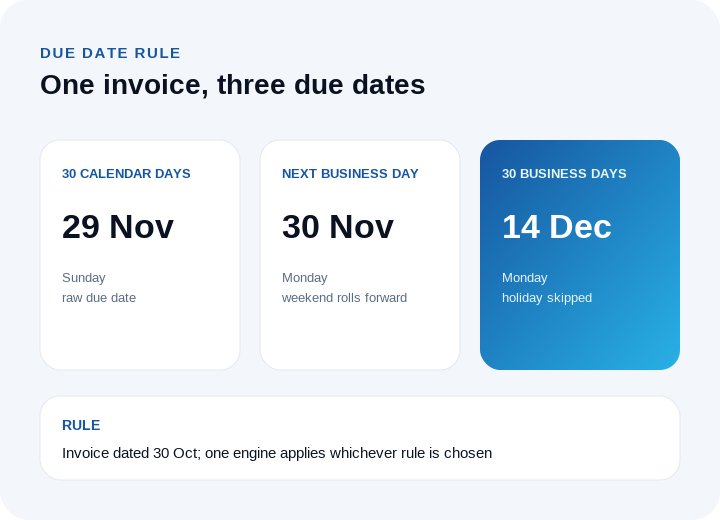
The valid rule depends on the contract and accounting practice; ask your accountant and legal counsel, and let the software apply the chosen rule consistently. For receivables, see customer account tracking; for contract dates, contract management software.
The day boundary is also written down: does "by 30 November" close at the end of the day or at the end of working hours? With a half-open interval, a payment at 23:58 on 30 November is on time and one at 00:00 on 1 December is late.
How Is Business-Day Calculation Kept Fast?
Day-by-day scanning is fine at small volume but expensive in bulk recalculation. The answer is a business-day index: for every day, store "is business day" and an increasing sequence number. Adding N business days means adding N to the sequence number and looking up the date: two reads.
| Measure | Day-by-day scan | With index |
|---|---|---|
| Adding 250 business days | About 350 day checks | 2 reads |
| Recalculating 1,000 records | 350,000 checks | 2,000 reads, 175 times fewer |
| Storage, 10 years | None | 3,652 rows per calendar; 14,608 for 4 calendars |
The index is small; the real job is consistency. One holiday shifts the sequence numbers of every later day, so the exception and the index are updated in the same transaction.
Which Scenarios Test the Calendar Calculation?
Date bugs appear on rare days, so the test set is built from boundary days (for general approach, see the software testing guide). The 12 scenarios below were verified against a real calendar.
| No | Scenario | Expected result |
|---|---|---|
| 1 | Thursday 19 November + 3 business days, Friday holiday | Wednesday 25 November |
| 2 | Thursday + 1 business day, Friday holiday, then weekend | Monday 23 November |
| 3 | Business days 2–30 November, ends included | 20 |
| 4 | Thursday 31 December + 1 business day, 1 January is a holiday in the table | Monday 4 January 2027 |
| 5 | Next year's holiday table not entered | Warning or rejection, no silent result |
| 6 | Friday 25 February 2028 + 2 business days (leap year) | Tuesday 29 February 2028 |
| 7 | Friday 16:30, 4 working hours | Monday 11:30 |
| 8 | Monday 12:00, 1 working hour (break boundary) | Monday 14:00 |
| 9 | Opened Saturday 10:00, 4 working hours | Monday 12:30 |
| 10 | Pause spans two days | Wednesday 14:30, 8 active hours |
| 11 | Clock-change night, daytime hours | 8 working hours unchanged |
| 12 | Payment on 30 November, 23:58 and 00:00 | First on time, second late |
Does a Calendar Change Affect Existing Records?
When a new holiday is added, the fate of open SLAs and promises is decided in advance. The suggested rule has two layers: internal targets are recalculated automatically; dates already communicated to the customer and written in the contract do not change, and only the difference is listed.
Example: with 400 open SLAs, an added holiday falls on the end time of 36 records, that is 9%. The system lists the 36 records with their difference and the owner approves. Each record carries the calendar version it was calculated with, so "why did this date come out this way" has an answer. Notification duties are left to legal counsel.
The user is shown the reason: "Estimated delivery: Tuesday 17:30; extended by one day because of a company holiday." A correct result without a reason is often read as a bug.
Which Measures Show the Calendar Engine Works?
| Measure | Calculation | Example value |
|---|---|---|
| Calculation accuracy | 117 of 120 records correct | 97.5% |
| Wrong-holiday corrections | Records corrected per month | 9, target 2 or fewer |
| Update lag | Between announcement and table entry | 6 business days, target 3 |
How Is the Payback of a Calendar Engine Calculated?
In a representative business there are 300 manual date calculations, 24 wrongly dated promises and 40 false SLA alarms a month; the hourly cost is ₺300.
| Item | Before | After |
|---|---|---|
| Manual calculation: 300 × 3 min = 900 min | 15 h = ₺4,500 | 100 min, ₺500 |
| Wrong promise: 24 × 1.5 h | 36 h = ₺10,800 | 4 × 1.5 = 6 h, ₺1,800 |
| False alarm: 40 × 20 min | 13.3 h = ₺4,000 | 6 × 20 min = 2 h, ₺600 |
| Monthly total | ₺19,300 | ₺2,900 |
The gain is 19,300 − 2,900 = ₺16,400; after ₺1,400 monthly running cost the net is ₺15,000. Development is 28 person-days (data model 6, algorithm 8, display 5, testing 6, holiday screen 3): 28 × ₺9,000 = ₺252,000, so payback is 252,000 ÷ 15,000 = 16.8 months. If the gain halves, the net becomes 8,200 − 1,400 = ₺6,800 and payback stretches to about 37.1 months.
In Which Six Steps Is a Calendar Engine Built?
- Inventory the calculations: List due dates, promises, SLAs, approvals and leave, with their calendars.
- Build the calendar model: Definition, pattern, exception and index tables.
- Assign the holiday process: Owners for entry, approval and the year-end check.
- Write one engine: Add, count and working-hour functions in one place.
- Write the tests: Automate the 12 scenarios.
- Add display and monitoring: Reason on screen, measures on a dashboard.
What Mistakes Are Common in Calendar Design?
- Hard-coding holidays: Every announcement then needs a release.
- A separate date function in every module: One rule gives three results in three places.
- Silent assumptions: Continuing with weekend logic when the table is empty hides the error.
- Storing a single end time: The counter breaks after a pause.
Recommended reading: What is shift and workforce scheduling software?
Recommended reading: What is workflow and approval software?
Custom Software With İnovabil: Time and Calendar Rules
At İnovabil our focus is building firm-specific software from scratch: custom software, ERP, CRM, e-commerce, web, mobile and integration. For calculations such as due dates, shipping dates, approval times or support targets, we recommend writing the calendar rules down during requirements analysis; which calculation uses which calendar and who owns the holiday data is settled there.
We built CRM, purchasing and mobile for Avcılar İnşaat; a purchasing system for İZBAN; logistics and shipment planning with wholesale order management for Karyak; and warehouse management plus a complaint and support management system for Sleepy. Send us a short description of your processes and we will record the rules together. For the wider picture, see what is custom software and our software development process.
Frequently Asked Questions
How is business-day calculation done in software?
Step forward day by day from the start; only days that are business days in the calendar decrement the counter. At volume, a precomputed business-day index is used.
How should public holidays be stored in software?
In a table, not in code, based on official announcements: one person enters, a second approves, and calculation warns when next year's table is incomplete.
How does SLA time work outside working hours?
The clock advances only in minutes when the calendar is open; an out-of-hours ticket starts at the next opening. A 4-hour ticket opened Friday 16:30 ends Monday 11:30.
How is the clock stopped while waiting for the customer?
Active time is kept cumulatively and pause intervals are recorded separately; on resume the remaining time is converted to a new end using the calendar.
Should open records be recalculated when the calendar changes?
Internal targets are recalculated automatically. Dates already communicated to the customer and written in the contract do not change; the difference is listed. Notification duties go to legal counsel.