

The sales team has closed a deal with a new dealer and the contract is signed, yet a month later the dealer still has not placed a first order. A missing tax certificate was requested twice, the credit limit decision sat on a manager's desk, and the portal login was opened late. This gap between closing the sale and the first order is where revenue quietly disappears. A customer and dealer onboarding process manages a new customer or dealer from application to first order and through the first 90 days, in one flow, with owned steps and measurements.
In this guide we cover onboarding stages, document collection and missing-document follow-up, verification and limit approval, task assignment and the checklist, time to first order and stage conversion, first-90-day health indicators, the CRM and ERP data flow, and the payback calculation. The examples assume a dealer network that receives 40 applications a month; all figures are illustrative, not an industry average or a real business's data.
What Is a Customer and Dealer Onboarding Process?
Onboarding is the process of setting up a new customer or dealer in your systems and getting them ready to place a first order after the sale closes. It covers application, documents, verification, limit and price, access, training and the first order.
It differs from the similar job on the employee side by its audience: our software adoption guide covers getting your own staff to use a new system, while onboarding manages a party outside your company, the customer or dealer, starting to work with you, so it also includes documents, credit risk and commercial terms. Our sales funnel article leaves this part at the "won" stage; onboarding continues from that point to the first order.
What Stages Does Onboarding Include?
Six stages are enough, and each stage should have an output. A stage without a defined output becomes a waiting point.
| Stage | Purpose | Output | Typical owner |
|---|---|---|---|
| 1. Application | Capture details and request in one form | Application record in the CRM | Sales representative |
| 2. Documents | Collect all required documents completely | Completed document list | Operations |
| 3. Verification and risk | Check identity and commercial eligibility | Approve or reject decision | Finance |
| 4. Limit and price list | Assign credit limit, payment terms and price list | Approved commercial terms | Finance and sales manager |
| 5. Access and training | Open the portal account and teach its use | Active user | Account manager |
| 6. First order | Get the first order placed | First order record | Sales representative |
How Do You Design Application and Document Collection?
Document collection is the longest and most repeated step in onboarding. The fix is one form that collects documents completely from the start, plus automatic reminders.
- One form: Company name, tax number, authorized person, address and request are collected in one form; required fields cannot be left empty and the form cannot be submitted without the document upload.
- A clear document list: The form says which document is requested and why. Which documents are valid, such as the tax certificate, signature circular and trade registry documents, is settled with your financial advisor (certified accountant) and legal counsel.
- Automatic reminders: An automatic message goes out on days 2 and 4 for missing documents, and each message lists only the missing item.
Let us see with an illustrative calculation how missing documents stretch the timeline. Today, half of 40 applications (20) arrive with an incomplete first package. A complete package takes 3 days; an incomplete one takes two follow-up rounds of 4 days each, so 3 + 8 = 11 days. The average is 0.50 × 3 + 0.50 × 11 = 7 days. With a form and reminders, the incomplete share falls to 25% (10 applications), a complete package takes 2 days and an incomplete one takes one round, 2 + 4 = 6 days: 0.75 × 2 + 0.25 × 6 = 3 days.
| Scenario | Incomplete share | Complete package | Incomplete package | Average |
|---|---|---|---|---|
| Current | 50% (20 / 40) | 3 days | 11 days (2 rounds) | 7 days |
| With form and reminders | 25% (10 / 40) | 2 days | 6 days (1 round) | 3 days |
Disclosure and retention obligations for the personal data collected through the application form should be assessed separately; for KVKK (Turkey's personal data protection law) and document retention details, consult your legal counsel.
How Do Verification, Limit and Price List Approval Work?
This stage is a decision stage, and it is where queues form most easily. Decisions bound to rules reduce waiting approvals.
Verification checks the consistency of documents (for example, whether the tax number matches the company name) and internal risk rules. A new dealer has no payment history, so the first limit starts conservatively. An illustrative calculation: expected monthly purchases of ₺45,000, 30-day terms and a new-dealer risk factor of 0.8 give an initial limit of ₺45,000 × 30 ÷ 30 × 0.8 = ₺36,000, revised after 90 days based on actual payment behavior. We explained the limit formula in our dealer management system guide and dealer-specific price list assignment in our B2B price list article.
The decision goes to different people by amount. The thresholds are illustrative:
| Initial limit | Approver | Target time |
|---|---|---|
| Up to ₺100,000 | Finance specialist | 1 business day |
| ₺100,001 – ₺300,000 | Finance manager | 1 business day |
| Over ₺300,000 | Senior management | 2 business days |
The chain, delegation and timeout rules need to be set up separately; we covered them in detail in our workflow and approval software guide, so we do not repeat them here.
How Do You Prepare Task Assignment and the Checklist?
A checklist is the sequence of tasks created automatically whenever a new dealer record opens. Each task has an owner and a target time; an overdue task goes to the manager.
| Task | Owner | Target time |
|---|---|---|
| Call the applicant, send the document list | Sales representative | Same day |
| Check documents and report missing items | Operations | The day the documents arrive |
| Verification and risk check | Finance specialist | 1 business day |
| Limit, terms and price list approval | Finance and sales manager | 1 business day |
| Open customer account and portal account | Operations | Approval day |
| Training and first login | Account manager | 1 business day |
| First-order follow-up calls (day 7 and 14) | Sales representative | Scheduled |
How Are Access, Training and the First Order Managed?
The portal account opens on the approval day, but "account opened" and "dealer is using it" are not the same thing. Training should be short and task-oriented: product search, basket, viewing prices and terms, and tracking order status.
- Roles and permissions: Who at the dealer places orders and who only sees prices is defined up front; see our role-based access control guide for details.
- Scheduled contact: If there is no first order by day 7, the representative calls; on day 14 the manager is informed.
For the scope of the portal and the difference between a dealer portal and a customer portal, see our customer portal article and B2B e-commerce guide.
How Do You Measure Stage Conversion and Time to First Order?
Two measures are enough: the conversion rate from each stage to the next, and the average time from application to first order. The first shows where you lose people, the second shows how long they wait.
In the illustrative example, 40 monthly applications produce 22 first orders before the process improvement and 26 after it. Stage conversion is computed by dividing by the previous stage:
| Stage | Before (people) | Before conversion | After (people) | After conversion |
|---|---|---|---|---|
| Application | 40 | — | 40 | — |
| Documents complete | 34 | 85.0% | 37 | 92.5% |
| Verification passed | 30 | 88.2% | 34 | 91.9% |
| Limit and price approved | 28 | 93.3% | 32 | 94.1% |
| Access and training done | 26 | 92.9% | 30 | 93.8% |
| First order | 22 | 84.6% | 26 | 86.7% |
| Total | 22 / 40 | 55.0% | 26 / 40 | 65.0% |
Abandoned applications fall from 18 to 14 (45% → 35%). Not all losses are errors: some applications that drop out at verification are records that should rightly be rejected. The 4 losses at the first-order stage are different, because the portal is open and training is done but the dealer has not ordered; this is the gap that scheduled calls close most.
When you track time stage by stage, the improvement becomes visible:
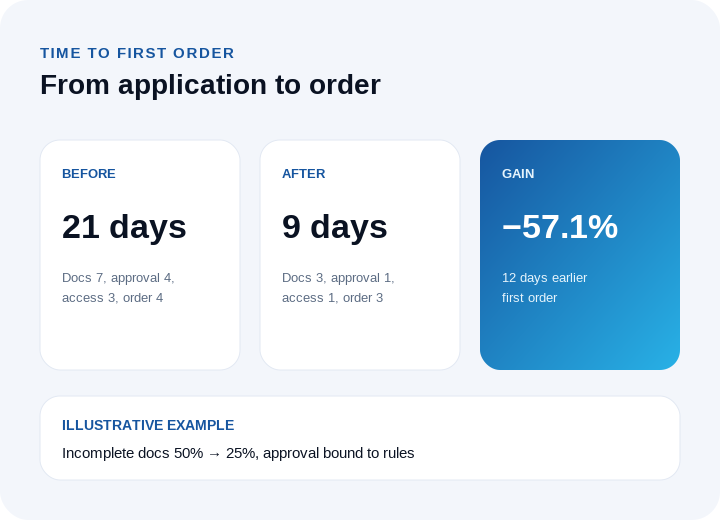
| Stage | Before (days) | After (days) |
|---|---|---|
| Document collection | 7 | 3 |
| Verification and risk | 3 | 1 |
| Limit and price list approval | 4 | 1 |
| Access and training | 3 | 1 |
| First order | 4 | 3 |
| Total | 21 | 9 |
The reduction: (21 − 9) ÷ 21 = 57.1%. This figure depends on the example's assumptions; take your own measurement on the current process first, then improve it.
What Are the First 90 Days Health Indicators?
Onboarding does not end with the first order; the first 90 days decide whether the dealer will work regularly. Four signals, at 25 points each, give a simple health score.
- Was the first order placed within 10 days?
- Did a second order arrive within 30 days?
- Does the dealer log in to the portal at least 3 times a week?
- Is 90-day revenue at least 80% of target? In the example the target is ₺120,000 per dealer.
| Dealer | First order | 2nd order | Logins / week | 90-day revenue | Score |
|---|---|---|---|---|---|
| A | Day 8 ✓ | Day 22 ✓ | 4 ✓ | ₺100,000 (83.3%) ✓ | 100 |
| B | Day 14 ✗ | None ✗ | 2 ✗ | ₺48,000 (40.0%) ✗ | 0 |
| C | Day 9 ✓ | Day 41 ✗ | 3 ✓ | ₺90,000 (75.0%) ✗ | 50 |
Thresholds: 75 and above is healthy, 50–74 is watch, below 50 is intervene. In the example A is healthy, C is on watch, and B is the dealer the account manager should call. Second order and portal logins are leading indicators, 90-day revenue is the lagging one; we explained the distinction in our KPI guide.
How Does Data Flow Between the CRM and the ERP?
Onboarding data lives in two systems: relationship and process information in the CRM, the customer account and commercial terms in the ERP. Entering the same information twice wastes time and creates errors.
| Data | Source | Target | When |
|---|---|---|---|
| Name, tax number, contact, address | CRM (application form) | ERP customer account | At approval |
| Limit, terms, price list code | CRM (approval record) | ERP customer account | At approval |
| Account code | ERP | CRM and portal | When the account opens |
| Balance and limit usage | ERP | CRM and portal | Daily or event-based |
| First order status | ERP or order system | CRM stage | When the order is created |
The critical rule is that the customer account opens only after approval and that duplicate records are blocked by tax number; we explained why in our master data management article, the role split between the two systems in our CRM and ERP differences guide, and the balance and terms side in our customer account tracking article.
What Does Shortening Onboarding Time Earn?
The gain comes from two places: the first order moving earlier and fewer lost applications. The calculation below is illustrative; plug in your own revenue, margin and cost.
- Speed gain: A mature dealer buys ₺45,000 a month, or ₺1,500 a day. If the first order moves 12 days earlier, the same 22 dealers add 22 × 12 × ₺1,500 = ₺396,000 in revenue.
- Fewer losses: Completed dealers rise from 22 to 26; 4 extra dealers × ₺120,000 (first 90 days revenue) = ₺480,000.
- Total revenue effect: ₺396,000 + ₺480,000 = ₺876,000 (for one month's application cohort).
- Gross profit: At a 25% margin, ₺876,000 × 0.25 = ₺219,000. Extra running cost (form, notifications, maintenance) is ₺24,000 a month; monthly net is ₺195,000.
- Investment: 45 person-days × ₺9,000 = ₺405,000 (form, task flow, CRM and ERP connection, portal account automation).
Payback: ₺405,000 ÷ ₺195,000 ≈ 2.1 months. The gains arrive with a delay, so look at sensitivity too. If the gain is half, monthly gross profit is ₺109,500 and net is ₺85,500: ₺405,000 ÷ ₺85,500 ≈ 4.7 months. So even if only half the improvement materializes, the investment pays back within the year.
How Do You Build the Onboarding Process in Six Steps?
Measure the current process first, then fix the step with the most waiting. You do not need to automate everything at once.
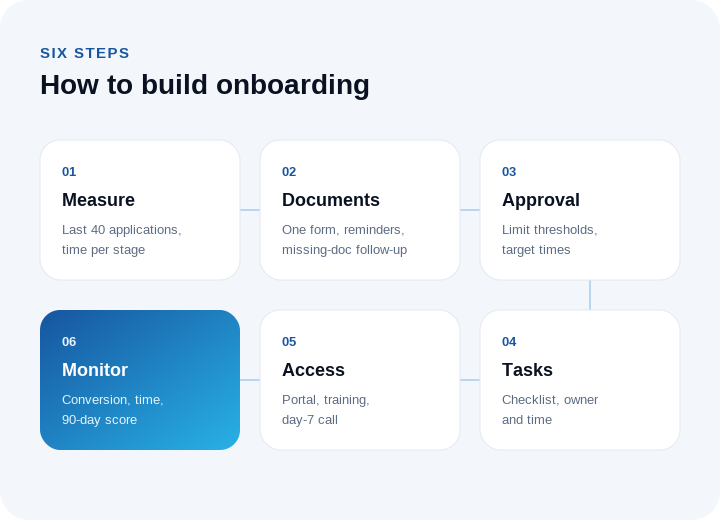
- Measure: Take the last 20–40 applications and work out how many days each stage waited and where people dropped.
- Fix the document flow: Set up one form, required fields, a document list and automatic reminders.
- Bind approval to rules: Write the limit thresholds and target times; make waiting approvals visible.
- Create the task sequence: Tie the checklist to the application record in the CRM and assign owners and times.
- Speed up access and the first order: Portal account on approval day, short training and a call on day 7.
- Monitor and improve: Review stage conversion, time to first order and the 90-day health score monthly.
What Are Common Mistakes in Onboarding?
- Dropping the job when the sale closes: A gap that nobody owns remains between the contract and the first order.
- Giving a high first limit with no history: Starting cautiously and raising by payment behavior is safer for a new dealer.
We recommend reading: What is a dealer management system? Target, tiered bonus, performance score and credit limit guide
We recommend reading: How to Manage B2B Collections and Receivables: Aging, DSO, CEI and Collection Priority Guide
We recommend reading: How to Design Mobile Push Notifications: Types, Permission, Frequency Caps and Measurement Guide
We recommend reading: How to Analyze and Prevent Customer Churn: NRR, Early-Warning Score and Action Decision Guide
We recommend reading: How to Design User Onboarding and the First-Run Experience: Activation, Product Tours, Empty States and Measurement
CRM, Portal and Process Digitization with İnovabil
At İnovabil, our focus is building company-specific software from scratch: custom software, CRM, ERP, e-commerce, web, mobile and integration. When setting up a process like onboarding that moves between the CRM, the ERP and a portal, we suggest first writing down the current steps, the waiting points and the integration need during requirements analysis; if part of it can be met with a ready-made product, we compare that with its cost too. The calculations in this article are illustrative and carry no claim of a separate onboarding product.
We built CRM, purchasing and mobile for Avcılar İnşaat; a purchasing system for İZBAN; logistics and shipment planning plus wholesale order management for Karyak; and warehouse management plus a complaint and support management system for Sleepy. Send a short summary of your processes and application volume; let us first measure the current flow together, then put together a written scope.
We recommend reading: Our software development process: step by step from analysis to launch
Frequently Asked Questions
What is an onboarding process?
It is the process in which a new customer or dealer is managed from application to first order and through the first 90 days, with document, verification, limit, price, access and training steps. Its goal is to shorten time to first order and reduce lost applications.
Is onboarding the same as software adoption?
No. Adoption is your own staff using a new system; onboarding is an outside customer or dealer starting to work with you, and it also covers documents, credit risk and commercial terms.
How is time to first order measured?
It is the average number of days from the application date to the first order date. If you also track it by stage, you see where waiting accumulates. In the example, 21 days fall to 9 with stage fixes; these figures are illustrative.
Which indicators should be tracked in the first 90 days?
Time to the first order, whether a second order arrives within 30 days, portal login frequency, and 90-day revenue against target. A simple health score built from these shows which dealer to call.
Does onboarding need off-the-shelf or custom software?
If the flow is standard and your CRM and ERP support a ready-made connection, off-the-shelf tools may be enough. If parts such as approval rules, the customer account flow and the portal are specific to your company, a custom build is needed. To decide, measure the current process first and write the requirements.